Reliable business Wi-Fi does not come from one powerful router in the middle of a building. It needs a stable wired core, well-placed access point units, separate networks for different users, and simple monitoring. SMEs comparing ceiling-mounted access point options should first map where people work and which devices must stay online.
Quick Take: Build the wired network first, then add enough access point units for coverage and capacity. Keep staff, guests, and connected equipment in separate segments. Check signal, load, and uptime after launch, and leave room to grow.
1. Start With the Business Need, Not the Hardware
Start with a short business survey. Count staff, laptops, phones, printers, scanners, cameras, sensors, and guest devices. Mark busy areas such as meeting rooms, packing stations, loading bays, and reception. List systems that cannot stop, including voice, payment, inventory, and CCTV.
Coverage means a device can see the network. Capacity means many active devices can use it at once. An office may show a strong signal but still feel slow if too many users share one access point. A warehouse may have fewer users, yet it needs stable service along every picking route.
Create a floor plan for each site. Mark walls, lifts, storage racks, machinery, yards, and cable routes. Concrete, metal, glass, and stored goods can weaken or reflect signals. Use the map to guide placement, then confirm important sites with an on-site wireless survey.
2. Use a Simple and Repeatable Network Architecture
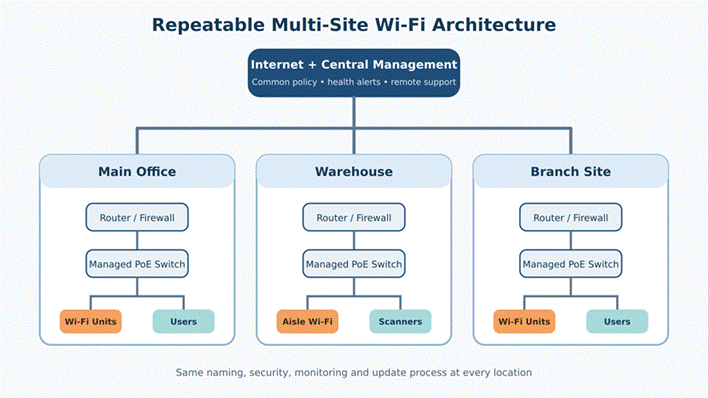
Most SME networks need four layers. Internet service connects to a router or firewall, which connects to a managed switch. The switch sends data and power through Ethernet to access point units. Central management shows network health and settings. This structure is easier to fix and expand than unrelated home routers.
Use Ethernet between the switch and each fixed access point when possible. This wired uplink gives every radio a steady network path. Power over Ethernet, or PoE, carries power on the same cable. It removes the need for a nearby socket and supports remote restarts.
Mesh can help where cable is not possible, but each wireless hop shares radio time and may reduce speed. Use it as an exception in busy sites. Test the wireless backhaul during a normal working day.

Figure 1. An office network works best when ceiling coverage is supported by a clean wired and PoE foundation.
3. Design for Each Working Environment
3.1 Offices Need Even Coverage and Smooth Roaming
Place office access point units near users. Open work areas, meeting rooms, break rooms, and reception need attention. Do not hide a unit in a cabinet or behind a large screen. An open ceiling position usually gives a clearer path than a low corner.
Too much radio power can be as harmful as too little. A laptop may stay with a distant access point instead of changing to a closer one. Use several well-placed units at sensible power levels. Keep the same secure Wi-Fi name across the office and provide enough overlap for roaming.
3.2 Warehouses Need Aisle-Level Planning
Racks, pallets, vehicles, and changing stock affect warehouse signals. A strong reading in an empty building may weaken after racks are filled. Test along working routes and at scanner height. Long aisles may need directional coverage, while packing areas need wider coverage.
Protect equipment from impact, dust, heat, moisture, and cleaning work. A unit placed too high may send energy above the devices below. Check antenna direction and test near cold rooms, loading doors, and outdoor staging areas.

Figure 2. Warehouse coverage should follow aisles, scanners, loading areas, and the real position of stored goods.
3.3 Multi-Site Operations Need One Standard
Use one repeatable design across branches. Each location should follow the same naming, security, device grouping, and update rules. A small branch may need fewer access point units, but its structure should remain familiar to IT staff.
Central management shows which site, switch, or access point has a problem and keeps security settings consistent. A site-to-site virtual private network can protect traffic to shared systems. Cloud services may go directly to the internet if policy and connection quality allow it.
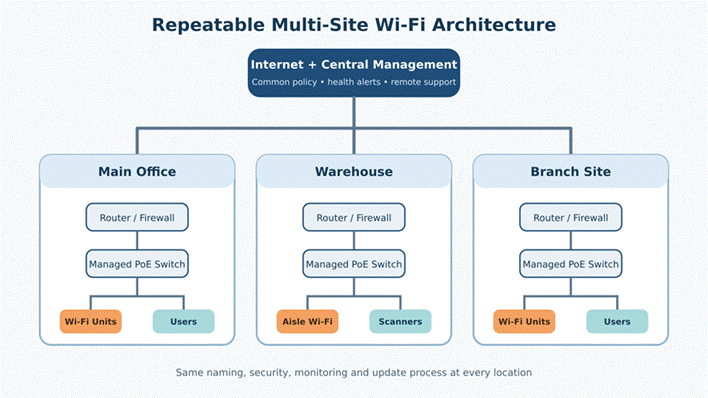
Figure 3. A repeatable site design makes monitoring, security, and future expansion easier.
4. Separate Users and Devices With Network Segmentation
Do not place every device on one flat network. Create separate segments for staff, guests, and equipment such as cameras, printers, or sensors. Staff may reach business systems, guests may use only the internet, and cameras may talk only to their recorder or management service.
Separation limits damage from a weak device or infected guest laptop. It also makes faults easier to understand. A traffic rise from cameras should not slow payroll or voice. Managed switches and routers can enforce these rules through virtual local area networks, or VLAN.
Keep the design manageable. Three or four clear segments are often enough. Record the purpose and access rules for each one. Use strong encryption, unique administrator passwords, and remove old accounts when staff or contractors leave.
5. Match the Design to the Main Risk
| Environment | Main Wi-Fi Risk | Placement Focus | Most Important Traffic |
| Office | Busy rooms and roaming gaps | Desks, meeting rooms, reception | Video, voice, cloud apps |
| Warehouse | Metal racks and changing stock | Aisles, packing zones, loading bays | Scanners, inventory, voice |
| Branch site | Limited local IT support | Simple repeatable layout | Cloud apps, payments, support |
| Multi-site core | Different settings at each location | Central policy and monitoring | Management and secure site links |
6. Add Basic Monitoring Before Problems Begin
Start with a dashboard that shows whether each router, switch, and access point is online. Track internet uptime, device load, channel use, and repeated connection failures. Set alerts for a site going offline, lost switch power, or unusual access point load.
Keep a record with site contacts, provider details, device names, cable labels, software versions, and a current floor plan. Use clear names such as “Warehouse Aisle 4.” This helps local staff check the correct device while IT works remotely.
Review the network after adding shelves, walls, machines, teams, or cameras. Check weak-signal reports and busy areas every few months. Install updates during planned maintenance, keep a configuration backup, and test its restore process.
7. Plan for Growth Without Buying Everything Today
Leave sensible room in the design. Choose a switch with spare ports and PoE power for more access point units, cameras, or phones. Use suitable cable and confirm that the router can handle expected users, security features, and internet speed.
Do not buy every future device today. Use a repeatable standard and reserve cable paths, switch capacity, network addresses, and licenses. Test the design in one representative area during normal work, correct it, and then use it at other locations.
The best SME Wi-Fi network is one the business can understand, monitor, and expand. A wired core, careful placement, clear segments, and consistent site standards create a stable base for daily work and future growth.
8. Frequently Asked Questions
8.1 How many access point units does a small office need?
There is no reliable answer based only on floor area. Walls, room layout, device count, and busy zones all matter. Start with a floor plan and estimated user load, then confirm the design with a wireless survey or an on-site test.
8.2 Should a business use one router or several access point units?
One router may serve a very small open room. Larger offices and warehouses usually work better with a router or firewall connected to several wired access point units. This gives more even coverage, more capacity, and easier roaming.
8.3 Do access point units need Ethernet cables?
A wired Ethernet uplink is the best choice for stable business use. PoE can carry data and power on one cable. Wireless mesh is useful when cable is not practical, but it should be tested because shared radio links can reduce speed and increase delay.
8.4 How can warehouse workers roam without losing connection?
Use the same secure Wi-Fi name across the warehouse, provide enough signal overlap, and avoid extreme transmit power. Test roaming while walking real picking routes with the same scanners and voice devices employees use during a normal shift.
8.5 Should guest and business devices share the same Wi-Fi?
No. Guests should have internet access without reaching internal systems. Staff devices, guest devices, and connected equipment should use separate network segments with clear access rules.
8.6 How can an SME manage Wi-Fi across several locations?
Use a repeatable design and central management. Keep the same naming, security, monitoring, and update process at every site. Clear labels and local contact details also help remote IT staff solve problems faster.


You must be logged in to post a comment.