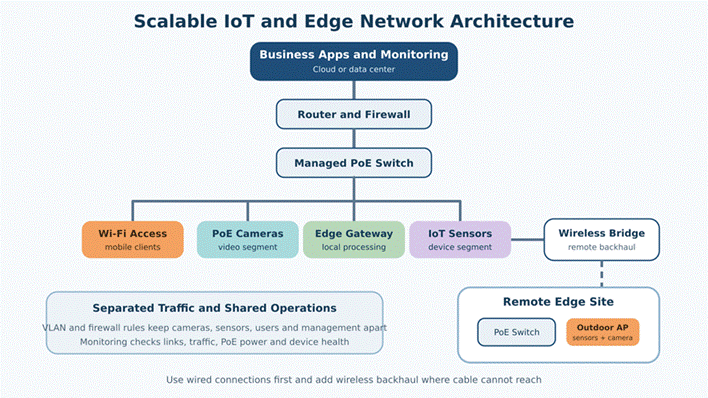
A scalable IoT network starts with the work each device must do. Sensors may send small readings, while cameras and edge computers can move large amounts of data. The network also needs stable power, safe access, and a clear path to business systems. Teams comparing outdoor wireless access point options should first map device locations, traffic, power sources, and physical barriers.
Quick Take: Design the network in layers. Use wired links where practical, wireless backhaul where cable cannot reach, and PoE for power and data. Separate IoT, camera, staff, and management traffic. Monitor links, power, and device health from the first day.
1. Begin With the Edge Workload
List every device and its job, including sensors, cameras, industrial controllers, gateways, scanners, and tablets. Record its location, movement, data use, and allowed offline time. A temperature sensor may send one small message each minute, while a camera may stream all day. They need different network plans.
Group devices by business impact. A soil reading may wait for the connection to return, but a safety alarm may need a fast response. Note which devices can store data during an outage. This shows where backup links, local edge processing, or stronger service targets are needed.
Estimate growth before choosing equipment. Count current devices and planned lines, cameras, buildings, or field stations. Reserve enough switch ports, PoE power, wireless capacity, and network addresses for the next stage.
An edge gateway can reduce traffic and help during short outages. It may collect readings, remove repeated data, run local rules, and store messages until the main service returns. Place it where it can reach both field devices and the backhaul. Record its storage limit, recovery behavior, and time settings so delayed data remains useful.
2. Plan Wi-Fi Coverage Around Device Locations
Wi-Fi coverage should follow device locations. Mark sensors, cameras, gateways, workstations, and mobile routes on a site plan. Add walls, metal racks, tanks, machinery, trees, slopes, and outdoor enclosures. These objects can weaken or reflect signals.
Place access point units with a clear path to clients. A high position may improve line of sight but sit too far above low sensors. Check the antenna pattern and direction. Test warehouses with filled racks and at scanner height. Outdoors, include seasonal plants and parked vehicles in the test.
Capacity matters when many cameras, handheld devices, or gateways share one radio. Spread busy clients across access point units and channels. Avoid maximum power on every unit because clients may hold on to a distant radio. Confirm the design with real devices during normal work.

Figure 1. Industrial edge networks must connect devices with very different traffic, mounting, and uptime needs.
3. Choose the Right Backhaul for Each Area
Backhaul carries traffic from an access point, switch, or edge gateway to the core. Use Ethernet or fiber when a safe cable route exists. Wired links give steady capacity. Fiber suits buildings, longer distances, and areas with electrical noise because it does not carry current.
A point-to-point wireless bridge can connect a remote building, pole, or cabinet when trenching costs too much. It needs a clear path, secure mounting, correct alignment, and weather protection. Leave clearance for trees, new structures, or moving equipment that may enter the radio path.
Cellular service can connect a temporary or remote site without local broadband. Signal, data cost, network load, and coverage may change. Test the exact modem, antenna, carrier, and mounting point. Important systems may need a second path.
| Backhaul Type | Best Fit | Main Strength | Main Check |
| Ethernet | Nearby fixed devices | Stable data and simple testing | Cable distance and route |
| Fiber | Buildings and noisy sites | Long reach and electrical isolation | Termination and protection |
| Wireless bridge | Remote buildings or poles | No trench between points | Line of sight and alignment |
| Cellular | Temporary or remote sites | Fast setup without fixed service | Signal, data plan, and carrier load |
4. Calculate PoE Power Before Installation
Power over Ethernet, or PoE, can run an access point, camera, gateway, or phone through its data cable. It reduces electrical work and supports remote restarts. The switch must still supply enough power for every device.
Check each device’s PoE standard and maximum power. Add the values, include cable loss, and keep spare capacity. A switch with enough ports may still lack total power. Check startup demand because cameras, heaters, or radios may briefly draw more power.
Remote cabinets need surge protection, grounding, backup power, and safe shutdown. Solar systems must support nights and poor weather, not only sunny afternoons. Monitor both connection and power so staff can separate a radio fault from a dead supply.
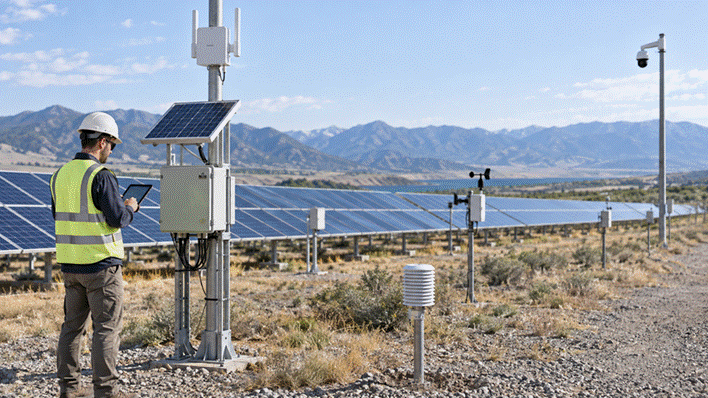
Figure 2. Remote edge sites need coordinated planning for wireless coverage, backhaul, weather protection, and power.
5. Separate Device Traffic With Network Segmentation
Do not place every edge device on one flat network. Separate cameras, sensors, industrial equipment, staff, guests, and management as needed. Cameras may reach a recorder, while sensors reach only an edge gateway or cloud service. Limit management access to approved administrators.
Virtual local area networks, often called VLAN, allow one managed switch and access point system to carry several separated networks. Firewall rules then control which groups can communicate. This limits the effect of a weak device, reduces unwanted traffic, and makes faults easier to trace.
Keep rules simple enough to maintain. Record each segment, address range, device group, allowed service, and owner. Use strong encryption, unique administrator accounts, and a process for adding or removing devices. Poorly recorded complexity can weaken security.
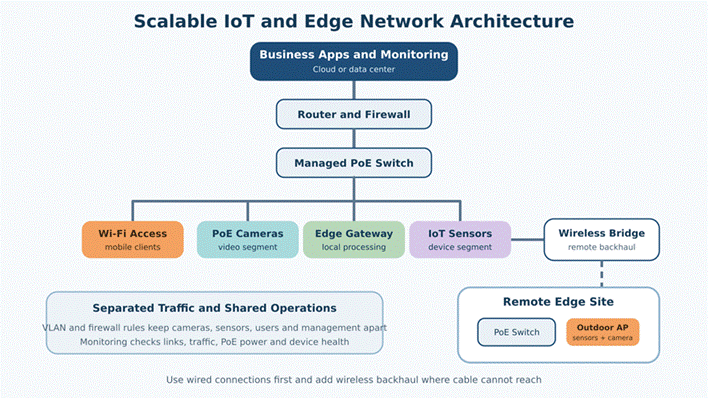
Figure 3. A layered design separates device traffic while supporting local and remote edge equipment.
6. Install Equipment for Real Site Conditions
Choose mounting points before installing cable. Technicians must safely reach devices for service. Keep radios away from large metal surfaces, heat, moving machinery, and vehicle paths. Outdoor equipment needs sealed cable entries, drip loops, grounding, and surge protection.
Label both cable ends and give each device a clear site name. “Pump Station Camera 2” is more useful than a serial number. Store photos of the final mount and cable route to help remote support guide local staff.
7. Monitor the Network and Plan Maintenance
A basic dashboard should show whether routers, switches, radios, gateways, and important devices are online. Track uptime, backhaul signal, switch errors, PoE use, radio load, reconnects, and unusual traffic. Alerts should identify the site and device.
Keep configuration backups, software versions, provider details, and local contacts. Install updates during planned maintenance and test recovery. Review the network after adding machines, racks, walls, cameras, or work areas because these changes can affect wireless and power plans.
Before handover, run a simple acceptance test. Walk the device routes, check camera streams, disconnect one backhaul link, restart PoE devices, and confirm that alerts reach the right person. Record normal signal, traffic, and power values as a baseline. Later, the support team can compare new readings with this baseline instead of guessing whether a change is serious.
A scalable edge network uses repeatable building blocks. Standard settings, names, labels, security rules, and checks make each new site easier to deploy. Pilot one area under real load, fix weak points, and repeat the improved design.
8. Frequently Asked Questions
8.1 Does every IoT device need its own internet connection?
No. Many devices can connect to a local network and send data through one edge gateway. The gateway can collect, filter, or store data before sending it to a business system or cloud service.
8.2 When should an edge device use wired Ethernet?
Use Ethernet when the device is fixed, a safe cable route exists, and stable capacity matters. It is especially useful for cameras, gateways, industrial computers, and access point units.
8.3 Is wireless backhaul reliable enough for industrial use?
It can be reliable when the link has clear line of sight, correct mounting, enough signal margin, and regular monitoring. Test the link during bad weather and normal site activity before using it for important traffic.
8.4 How much spare PoE power should a project keep?
Keep enough spare budget for startup peaks, cable loss, and planned devices. The exact amount depends on the switch and equipment. Check both the power per port and the total switch budget.
8.5 Why should cameras and sensors use separate network segments?
They have different traffic and access needs. Separation reduces unwanted communication, limits the effect of a damaged device, and makes heavy camera traffic easier to control.
8.6 What should teams monitor first in a new edge deployment?
Start with link uptime, signal quality, switch errors, PoE use, device reconnects, and traffic load. These checks reveal many common coverage, cable, power, and capacity problems.


You must be logged in to post a comment.